

Skip to content
Search
• Gmail • Employee Login
Penn High School
Penn High School
  • Quick Links
    • Contact
    • Menus
    • School Calendar
    • District Calendar
    • Naviance Logo
      Naviance
    • School Newsletter
    • Safe School Helpline
  • Canvas
    • For Parents
    • For Students & Teachers
  • Skyward
  • Newsletter
  • Contact
  • Support
Penn High School
  • P-H-M Home
  • Welcome
  • Students & Parents
  • Counseling
  • Academies
  • Departments
  • Athletics
  • Performing Arts
  • Community

Home » StudentSquare

Report Bullying
and
Anti-Bullying Resources

Latest News

  • Penn places third in Speech State Tournament
  • Penn DECA students excel at State
  • Teacher Job Fair on March 26
  • Penn Speech & Debate Team qualifies students for Nationals
  • Penn Jazz Ensemble qualifies for State
More News

StudentSquare

StudentSquare logo

While parents are using ParentSquare to stay informed, Penn students can use StudentSquare to receive updates from athletic and academic team coaches, as well as club sponsors. Through StudentSquare, students can also get the school closings and delay alerts.

StudentSquare is only for Penn students. This is how athletic and academic coaches, along with extracurricular teacher club sponsors will communicate with their students. Penn High School will also share general important student information via StudentSquare. Academic communications will still continue through Canvas.

Students, you can choose to receive notifications conveniently via text or app notifications, or stay with school email. Whichever method you choose to receive communications, you will receive the messages safely and securely without the exchange of personal information!

Coaches and club sponsors that want their students to use StudentSquare will tell you to download the app and set up your account.

There are a few different ways you can activate your StudentSquare account:

  • Check your P-H-M email for an activation email from StudentSquare. 
  • Download the app from the App store or Google Play.
  • Go to www.mystudentsquare.com. If you go to the website, use the “Sign in with Google” option.
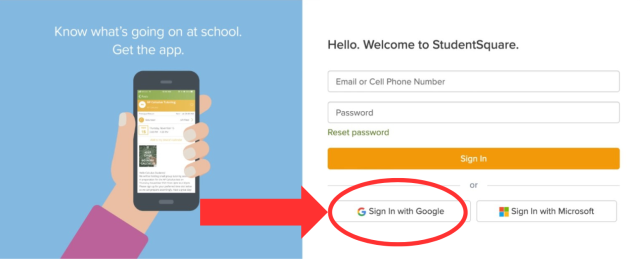
    StudentSquare Google login

Watch this short video for more information.

P-H-M Schools

  • Bittersweet Elementary School
  • Elm Road Elementary School
  • Elsie Rogers Elementary School
  • Horizon Elementary School
  • Madison Elementary School
  • Mary Frank Elementary School
  • Meadow's Edge Elementary School
  • Moran Elementary School
  • Northpoint Elementary School
  • Prairie Vista Elementary School
  • Walt Disney Elementary School
  • Discovery Middle School
  • Grissom Middle School
  • Schmucker Middle School
  • Penn High School
P-H-M Logo
56100 Bittersweet Rd, Mishawaka, IN 46545
(574) 258-9500

Copyright © 2026 P-H-M School Corporation
  • Login
  • GMail
  • Home Access Center
  • Clever
  • Terms
  • Privacy Policy
  • Careers
  • Accessibility