
Skip to content
• Gmail • Employee Login
Penn High School
Penn High School
    • Contact
    • Menus
    • School Calendar
    • District Calendar
    • Naviance Logo
      Naviance
    • School Newsletter
    • Safe School Helpline
    • For Parents
    • For Students & Teachers
  • Skyward
  • Newsletter
  • Contact
  • Support
Penn High School
  • P-H-M Home
  • Welcome
  • Students & Parents
  • Counseling
  • Academies
  • Departments
  • Athletics
  • Performing Arts
  • Community

Latest News

  • Penn AP Drawing students earn Scholastic honors
  • Penn students present at State Science Fair
  • Penn Science Olympiad students earn Top 10 finishes at state
  • Sreeja Bhattacharjee earns Scholastic National Silver Medal
  • Schafer Gear Works Names Penn Robotics Lab
More News

Home » Uncategorized » Page 38

Media Center Home Page

Procedures and Information

Welcome to the Penn Media Center website! We hope that you will take full advantage of what the Center has to offer. Mrs. Kizer and Mrs. Whittaker will be happy to assist you in any way that they can. Please stop by if you have any questions and ask either of them for assistance. You can also contact Mrs. Kizer by email at mkizer@phm.k12.in.us.

Checkout

All fiction, non-fiction and paperback books may be checked out for four weeks at a time. Reference books, magazines, and selected videos go out for one week. Please show your ID card to check out items.

Overdues

The charge for items that are overdue is five cents per school day. There is no charge for weekends or school holidays.

ID Cards

Your student ID card is also your library card. You must have it to check materials out and also to get study hall passes. Please wear your ID whenever you are in the IMC. School rules require that you wear your ID while you are in the building.

Computer Network

The IMC has 30 networked Windows machines. Please note that the IMC computers are only to be used for class-related research or word processing.  There are two laser printers and you’re welcome to print out the pages that you need at no cost. However, we ask that you print only what you need for school assignments.

Passwords

The IMC staff can help with password problems for HAC and PHM gmail. Stop by the IMC and talk to Mrs. Kizer or Mrs. Whittaker and we can tell you what your password is or change it for you.

Services

Chromebooks


The IMC has loaner Chromebooks for days when your personal Chromebook is in the Tech Dept for repairs or if you should happen to forget yours.  Stop at the front desk and we’ll check one out to you that you can keep until you get your Chromebook back from repairs or just for the day if you’ve forgotten yours.  We have a limited number of Chromebooks available, so please stop by at your earliest convenience.

Flash Drives

We also have wristlet flash drives if you need one.  You can save documents from your Chromebook and use the flash drive to print from the IMC computers.

Photocopies

Photocopies are available at the front desk. Our student assistants will run your copies for you, so please ask the assistant at the desk when you need copies. The cost is ten cents per copy.


Art Gallery

 Welcome

to

The Penn Kingsmen Art


Gallery

Penn High School is very fortunate to have a gallery that features both professional artists and student art work. Take time to come visit the gallery and enjoy the exhibitions available to you.


Exhibitions for 2013–14

September 16th – Oct 18th:

Expressive: Calligraphy and Book art by Anne Binder

Open for additional public hours on Sept 26th from 6:30-8:30 PM

Artist presentation at 6:45


October 25th – December 2nd:

Faces and Figures: Paintings, Drawings and Sculptures by Robert R. Williams

Special presentation & pastel portrait demonstration by the artist on November 21st during B2/ 10:00-11:23

For a pass to this presentation- see any Art Teacher, Mrs. Nicolini, or Miss Miller (room 154)


December 9th – January 23th:

Printmaking at IUSB: by Alan Larkin, IUSB art professor & IUSB

Printmaking Students

Charity Crafts: Handmade artisan crafts, a percentage of the profits from all 3D craft items sold will go to various charities


January 30th – February 24th:

Graphic Design & AP Studios

Art: by Thom Andreae’s classes

Ceramics: by Becky Brown’s classes


March 4th – March 26th:

Scholastic Art Award Winners

Ceramics: by Becky Brown’s classes

Painting: by John Cassady’s classes

Photography: by Betsy Dunham’s

classes

Sculpture: by Beth McKechnie’s classes


April 3rd – May 5th:

Ceramics: by Becky Brown’s classes

Drawings: by Barb Miller’s & John

Cassady’s classes

Introduction to 3D: by John

Cassady’s and Becky Hope’s classes


May 9th – May 30th:

Teacher’s Choice: Art Teachers

choice selections, 2013-14 Award winning artwork (other than Scholastic), the best of the Writing Prompt Responses (make sure to get yours submitted to your area teachers or to Miss Miller/ room 154 after visiting the gallery)

U Can Paint 2: Selected work from an

art experience/fund raiser for the Penn Kingsmen Art Gallery (info for this 2013 winter event available through the PHM Ed. Foundation)

Silver Mile: Saturday May 10

Artist demonstration in gallery 9 AM until

noon


Robert R.Williams will be our guest

artist for this event demonstrating portraiture. He will be demonstrating charcoal and/or pastel portraiture form live models and can take orders for future work. Rates are very reasonable for original heirloom art and a part of the profit helps support the gallery. Come see him work. It is a fascinating event to watch and a good opportunity to get your portrait painted! 

Science, Technology, Engineering & Math Academy

Preparing Students to Succeed in a Technology-Dependent Society

Why STEM Academy?

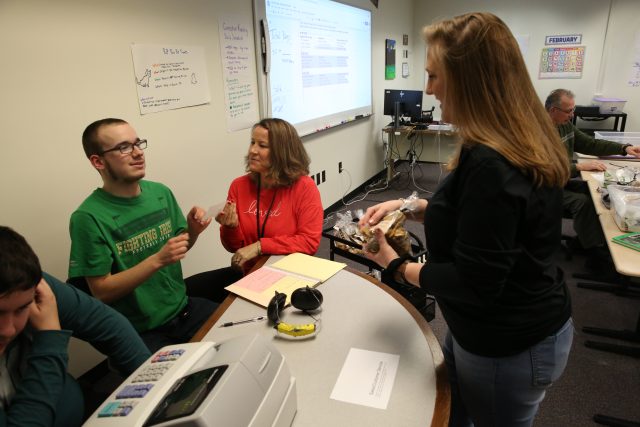
If you enjoy figuring out how an object works, doing puzzles, understanding the human body, discovering the secrets of nature or creating new applications for existing technology, then consider selecting the STEM Academy. Choosing the STEM Academy will be the beginning of an exploration of fields such as structural design, computer science, nanotechnology, environmental science, assistive technologies, robotics, physics, chemistry and biology. Each of the fields that STEM explores features technology that plays a central role in our daily lives, including cell phones, computers, the Internet, cars, bridges, food and medicines. If these are topics that interest you, STEM is an appropriate choice. A STEM Pathway can prepare you for many career options. Penn High School enjoys numerous partnerships with the community to enhance learning opportunities.
STEM Academy Pathways

Explore these suggested pathways designed to expose and prepare students for further study.

  • Technology Exploration
  • Manufacturing/Construction/Trade
  • Environmental-Agricultural
  • Engineering Exploration
  • Pre-Medicine

Contact information

STEM Faculty

Health & Human Services Academy

Creating life-long learners through authentic problem solving, critical thinking, community involvement, and the exploration of the diverse opportunities within the areas of health and human service-related careers.

(more…)

Exceptional Education

Penn High School is dedicated to fostering college and career readiness in an inclusive learning environment tailored to individual learners and their unique learning styles. Our approach emphasizes personalized support and instruction across a range of services, primarily focusing on enhancing skills and knowledge for each student’s success. The services provided are designed to ensure equitable access to education, promote individualized instruction, and empower students to achieve their academic, social, and career goals in alignment with state and federal guidelines.  Services are determined within the Case Conference Committee. 

Exceptional Education Faculty

Courses and Services

Ex Ed Purr Pet Treats   Ex Ed Graduation


Program of Studies

Penn High School provides an extensive listing of all course descriptions in the Program of Studies document. Students and parents should use this document to learn more about courses offered during the school year’s referenced in the documents. This is a valuable resource tool to use when families are working together to develop their student’s upcoming scheduling. The Program of Studies also explains and lays out the various opportunities available through Penn’s seven Academies, which provide college and career pathways—ensuring that our students are well prepared for the future that lies ahead for them.

  • Click here to download a PDF copy of the 2026-2027 Program of Studies.
  • Click here to download a PDF copy of the 2025-2026 Program of Studies.

*Please note what Course Fees are allowed under, HEA 1001-2023, are an estimate based on previous years.

Use these step-by-step instructions to navigate the Program of Studies:

You can easily navigate through the 2026-2027 Program of Studies to the different subject areas using one of four ways:

  1. Using the Bookmarks option in Google Chrome.
  2.  Using Bookmarks in Adobe Acrobat Reader
  3. Using the hyperlinks in the INDEX (pgs. 169 & 170)
  4. Searching the document in Chrome or Adobe
1.  Using the Bookmarks option in Google Chrome

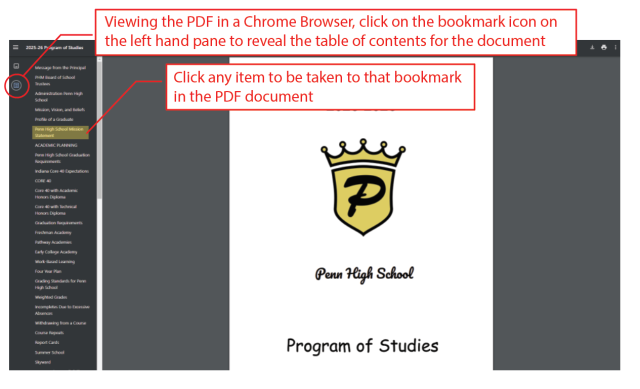
The first way is to view the PDF in a Google Chrome browser. When you click the hyperlink for the 2026-2027 Program of Studies, a new window will pop up.

Please refer to the screenshot image below & follow these instructions to navigate within your Google Chrome browser pop-up window:

  1. Click the Bookmark icon in the top left hand corner.
  2. The Bookmarks menu, a “Table of Contents” like feature, will appear as a drop-down menu.
  3. You can then click on any of the subjects, and you will be taken to that bookmark in the PDF document.
  4. Expandable sections are denoted with arrows to the right of the section name.

2.  Using the Bookmarks in Adobe Acrobat Reader

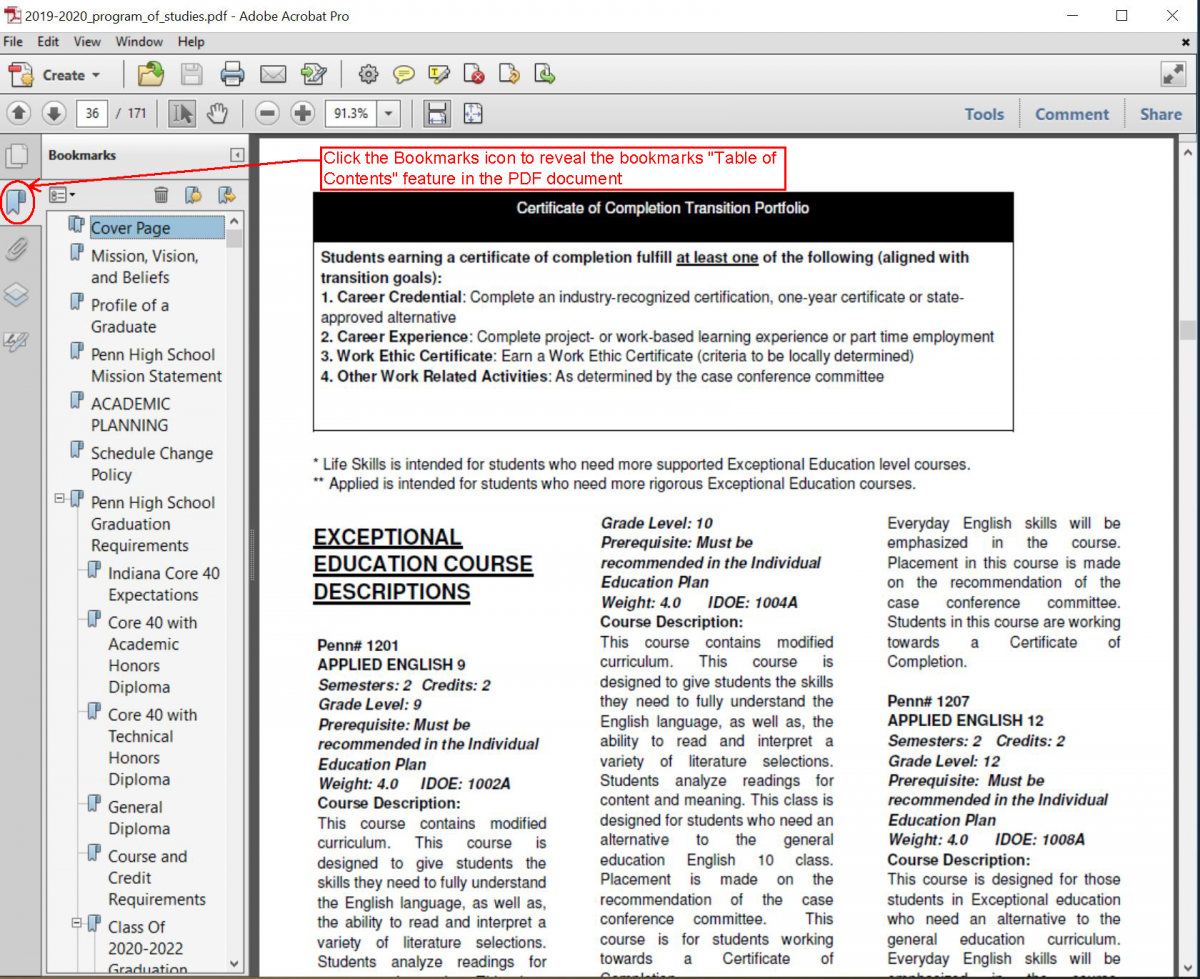
Depending on your settings, the Bookmarks Bar in Adobe Acrobat may or may not automatically open.

If it is not opened, please refer to the Screenshot #1 image below & follow these instructions to navigate the Bookmarks menu in 2026-2027 Program of Studies:

  1. Click the Bookmark icon in the left hand side bar menu, that will open the Bookmarks menu, “Table of Contents” like feature.
  2. You can then click on any of the subjects, and you will be taken to that bookmark in the PDF document.
  3. Expandable sections are denoted with arrows to the right of the section name.

Screenshot #1
Adobe Bookmarks view screenshot

You can also can see in Screenshot #2 image below a way to view a thumbnail of all the pages in the document, while also viewing the content. All you have to do is click on the “Page Thumbnails” icon on the left hand side above the Bookmarks icon.

Screenshot #2
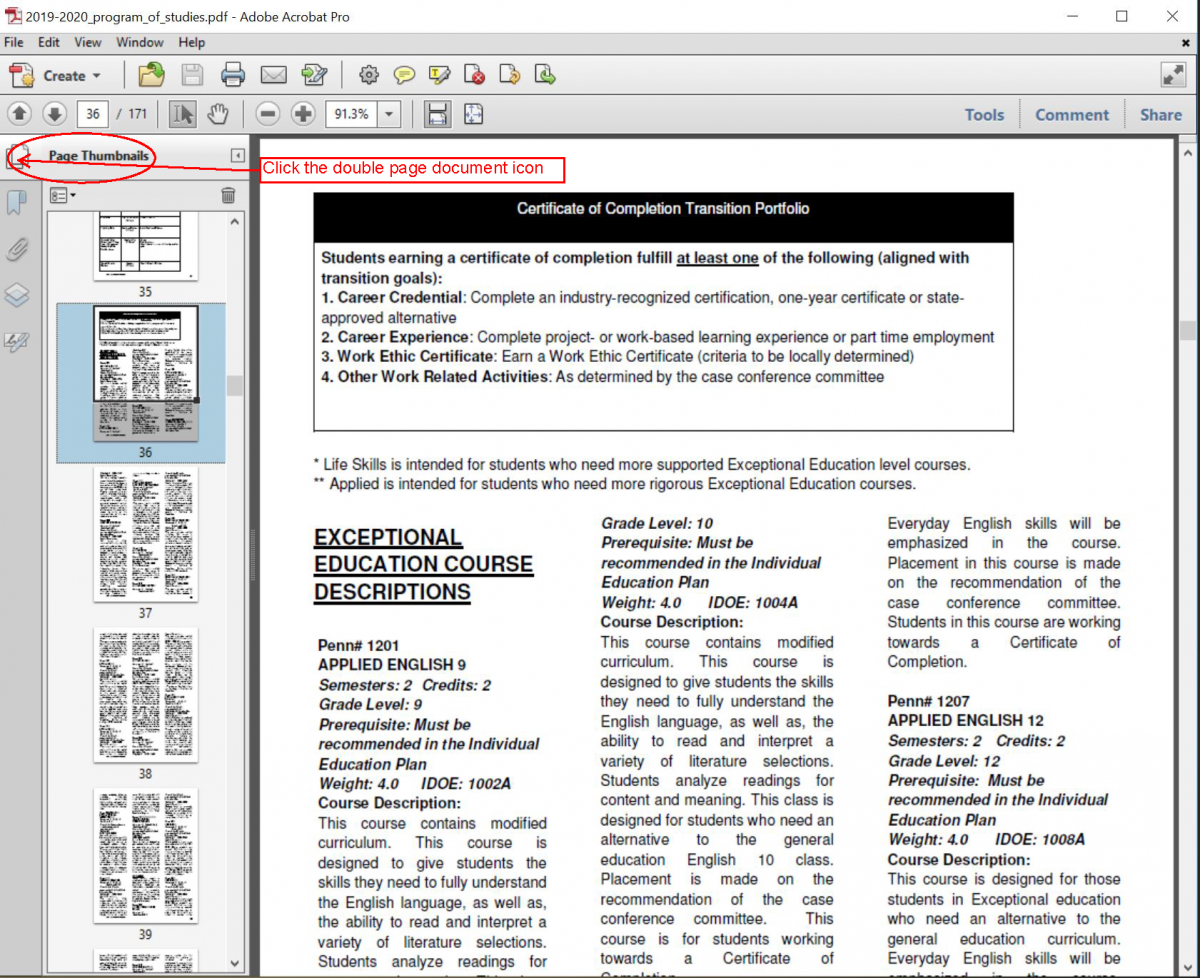
 Adobe Thumbnails view screenshot

3.  Using the hyperlinks in the INDEX (pgs. 169 & 170)

There are hyperlinks to each section of the Program of Studies embedded in the Index Table of Contents at the back of the POS.

Scroll to the end of the document to pages 169 & 170.

As you can see in the screenshot image below, you will see the sections highlighted in blue, denoting that they are hyperlinks. All you simply have to do is click a hyperlink and it will immediately jump you to the first page of that section.
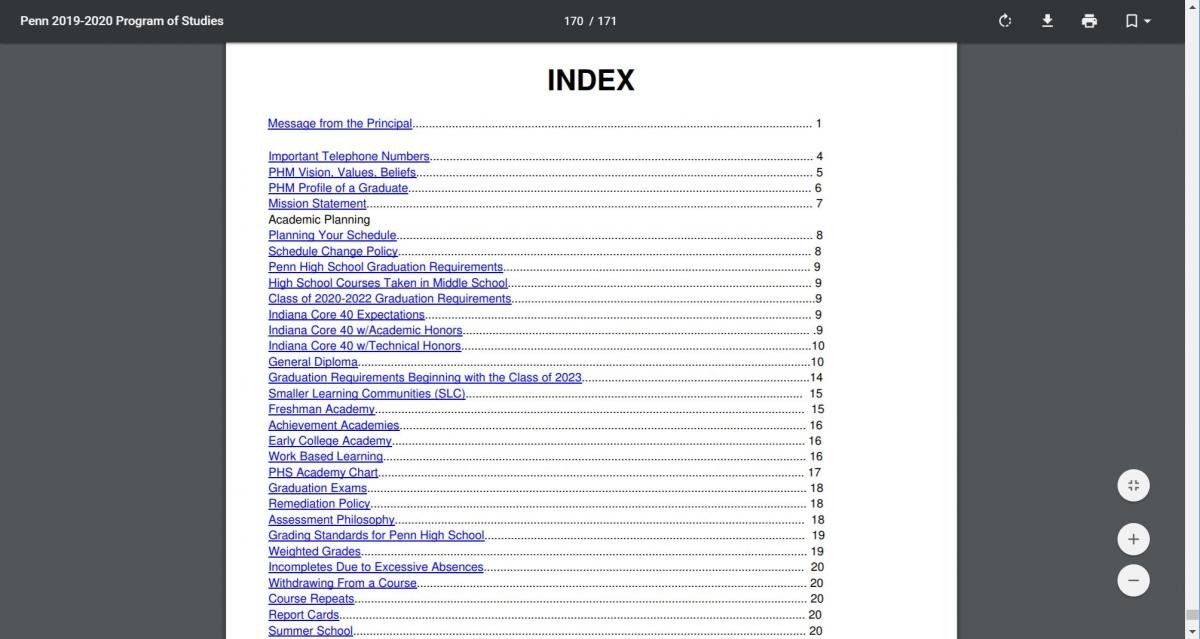
 

Index screenshot

4.  Searching the document in Chrome or Adobe

Using the simple “Search” function is the quickest way to navigate a document. When you open it regardless whether you open the document in a Chrome browser or in Adobe Acrobat Reader, follow these simple instructions and  refer to the screenshot image below:

  1. Use Control “Ctrl” function key & hold down the letter “F” key on the keyboard, to get the Search box function to appear.
  2. A dialog box will pop up allowing you to type in the key word you wish to search the document for.
  3. This will bring you to the first time the word you enter is found and highlight it. 
  4. If you hit the right arrow next to the search box, it will take you to the next occurrence.
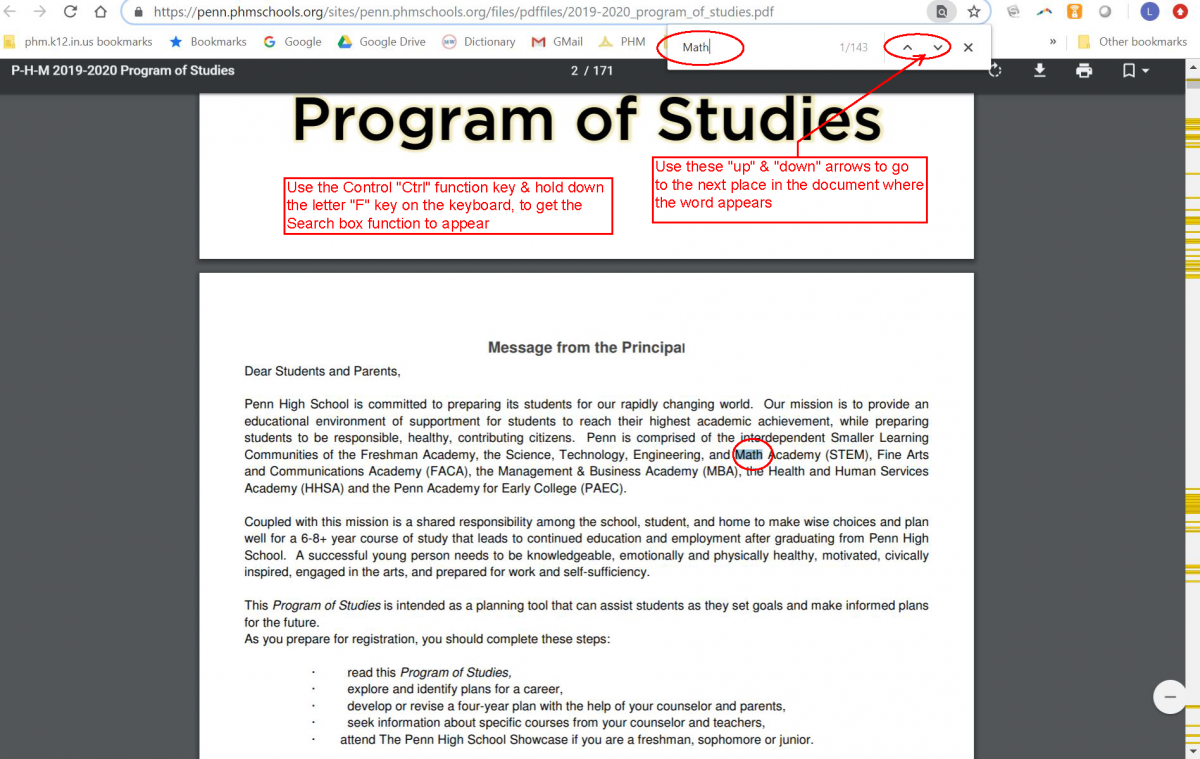
 

Search screenshot


*To view the PDFs on this page, Adobe Acrobat Reader is required. If you do not have Adobe Acrobat Reader, please visit Adobe’s website, at this link get.adobe.com/reader/, to download your free version.

After you open the PDF you can search the document for relevant information by hitting the Control “Ctrl” key (Command Key on a Mac) and the letter “F” key on the keyboard. This will bring up the “Find” dialog box.

If you are unable to access any page(s) or documents on our website, please email our District Webmaster at helpdesk@phm.k12.in.us with the exact url web address of the page or document you were attempting to access and any other details. Be sure to provide us with your name and contact information so that we may provide you with the information in another format.

You may also call Penn Counseling Office, Monday-Friday, 7:15 a.m. – 3:45 p.m., at (574) 258-9502.

Click here to view our full accessibility statement.


SAT/ACT

The College Board has announced test dates for this and future school years.

http://sat.collegeboard.org/register/sat-us-dates

The ACT will be offered at Penn in September and February.  Click the link below to learn specific dates for the ACT.

http://www.actstudent.org/regist/dates.html
 

Please click on the links below to access the ACT and SAT college admissions tests:

  • SAT
  • ACT

Seniors

College Application Process

For those seniors pursuing admission to a postsecondary institution, the college application process can be confusing.  Use the links below to simplify that college application process and make your senior year less stressful than it already is!

  • College Application Procedure
  • Financial Aid Night
  • Scholarship Information
  • Graduation Information – The Class of 2025 graduation ceremony will be held at Notre Dame at 7 p.m., Monday, June 9, at Purcell Pavilion.

Looking Toward the Future

As prospective junior and senior students at Penn High School looking toward the future, here is information to help you plan ahead for a successful transition to post-secondary education. 

Junior Year

  • Be aware that for your senior year you will need to register for e-transcript at penn.phmschools.org or docufide.
  • You should take the PSAT NMSQT at the beginning of the year even if you took in in the tenth grade.  This test may qualify you for the National Merit Scholarship—the test is only taken junior year. Sign up in guidance after spring break tenth grade year. 
  • Take the SAT (Reasoning Test) or ACT once in the middle of the year (toward the end of the school year if currently in geometry) and then again in the Spring (if scores aren’t to your liking)—have scores sent directly to colleges of interest.
  • To sign up for the SAT (Reasoning Test) go to collegeboard.com  and for the ACT go to actstudent.org  Both will need our Penn High School code which is 152347—Have the College Board or ACT send scores directly to colleges of your choice.
  • Start to narrow your college choices.  Go to www.collegeboard.com  (college matchmaker service) for assistance.
  • Focus on grades—remember colleges look only at your first three years of high school when making a decision of admittance!
  • Complete in May your senior survey which counselors use to make recommendation when completing your application.
  • Make a list of persons who you could ask for a Letters of Recommendation—remember not all need them.
  • Start the scholarship search process (grades 11 and 12)—Many are listed in our college resource room and on the guidance web page.

Senior Year

  • Apply to colleges on- line and register for e-transcript at the penn.phmschools.org or docufide.com—quick and easy way to get transcripts sent to colleges.  Apply to colleges late August through October—the earlier the better.
  • Take SAT or ACT if necessary—Have college board or act.org directly send your scores to the colleges planning on attending!
  • Check Guidance website frequently for general and scholarship information—penn.phmschools.org (go to guidance).
  • Most technical and junior colleges do not require a SAT or ACT—check with the school.
  • Make career plans for after high school.
  • Order cap and gown for graduation
  • Secure Letters of Recommendations if needed—some colleges do not require them.
  • Apply to the NCAA Clearinghouse for Div. I or II level (you may apply after junior year) at ncaa.org
  • Apply for financial aid after January and before March 10 at www.fafsa.ed.gov
 

Juniors

Junior Year Scheduling Information

We have a number of resources listed below that can help students and parents prepare for the junior year.  In addition, this scheduling information and all other information related to the Penn High School Counseling Center is available in the Counseling Center Canvas course. 

  • Senior Course Menu
  • Junior-to-Senior Slide Deck
  • Skyward Course Request Video

​If a student and/or family members needs further assistance, please contact a member of the Counseling Center Staff … we will be happy to help you!

P-H-M Schools
  • Bittersweet Elementary School
  • Elm Road Elementary School
  • Elsie Rogers Elementary School
  • Horizon Elementary School
  • Madison Elementary School
  • Mary Frank Elementary School
  • Meadow's Edge Elementary School
  • Moran Elementary School
  • Northpoint Elementary School
  • Prairie Vista Elementary School
  • Walt Disney Elementary School
  • Discovery Middle School
  • Grissom Middle School
  • Schmucker Middle School
  • Penn High School
P-H-M Logo
56100 Bittersweet Rd, Mishawaka, IN 46545
(574) 258-9500

Copyright © 2026 P-H-M School Corporation
  • Login
  • GMail
  • Home Access Center
  • Clever
  • Terms
  • Privacy Policy
  • Careers
  • Accessibility