If you are new to Canvas, reading the information below will help you get the most out of your first visit!
Canvas Information for Parents
Canvas is a Learning Management System (LMS) being used by P-H-M, particularly in the secondary grades (6 -12). Teachers can place class content online for students and parents to view. Parents are able to log in to Canvas using their Skyward login name and setting a password. If you do not know your Skyward/Canvas login information, email familyaccess@phm.k12.in.us (include your name, student’s name and ID number) and it will be sent to you.
Below is a list of Canvas-related topics. Click on a topic below to learn more!
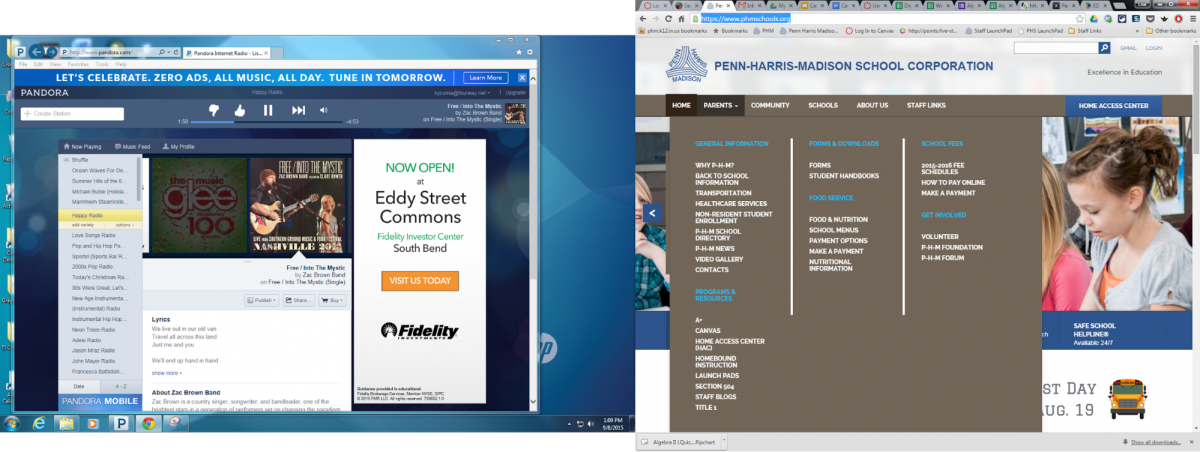
The easiest way to to log into Canvas is to go to the PHM website, look for Parents,
Canvas is located under Programs & Resources.
The URL is: https://phm.instructure.com You can copy the link and paste it into your browser or click on it and the pick the link that appears below it and Canvas will automatically be opened in another tab or window.
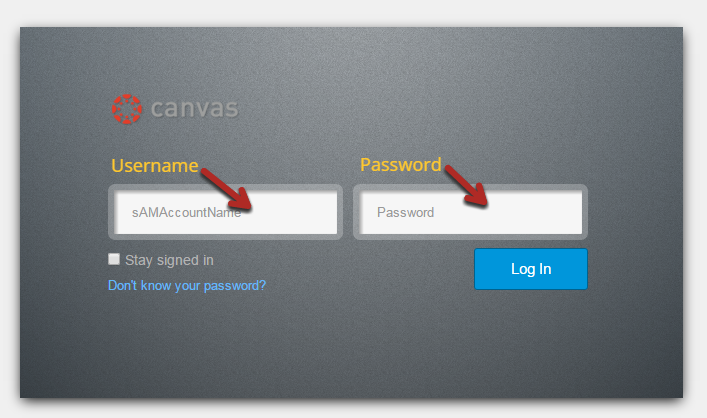
Parents log in using their Skyward username. On your first visit you will need to set your password using the “forgot password” link. If you do not know or remember your Skyward /Canvas login information, email familyaccess@phm.k12.in.us to have it sent to you. Be sure to include your name, student’s name and ID number in your email.
Type in your username in the first space and your password in the second space.
Setting Email Notifications/Canvas Preferences
As a parent, you will receive email notifications for informational purposes about your student’s courses. Notification preferences are located in your Canvas user profile.
Notifications are sent using the Canvas contact methods as specified in your account. For parents, they are sent to the email address that was given to the school for contact purposes. On Skyward you can look on the Registration tab to see if the email we have in the system is the one you prefer and is spelled correctly. This email address is used by both Skyward and Canvas.
Each Canvas notification defaults to a specific notification type, but you can set your notification preferences at any time by following the steps below.
● When you are logged into Canvas, open the User Settings. It is located in the upper right corner of your screen.
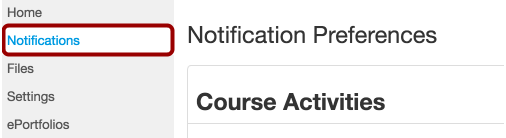
● Open Notifications – click on the word Notifications on the left menu.
● Edit your notification preferences
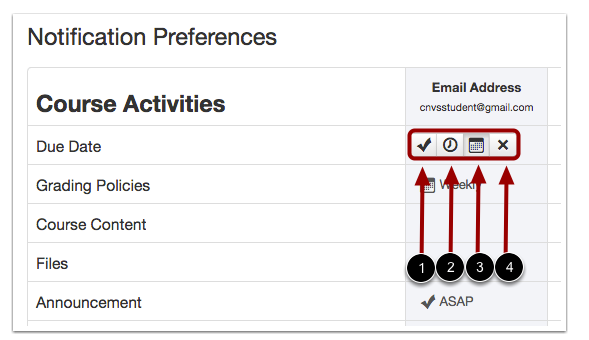
To change a notification for a contact method, hover over the notification type you want to change. Select one of four options.
● Select the Check mark icon to be notified immediately of any change for the activity.
● Select the Clock icon to be notified daily of any change for the activity.
● Select the Calendar icon to be notified weekly of any change for the activity.
● Select the X icon to remove the notification preference so you won't be notified of any change for the activity.
Note: Each set notification preference will automatically apply to all of your courses. They cannot be set individually for different courses or if you have multiple students. Be aware that some notifications do not apply to parents (as observers) even if you set a preference for them.
What do Parents see in Canvas?
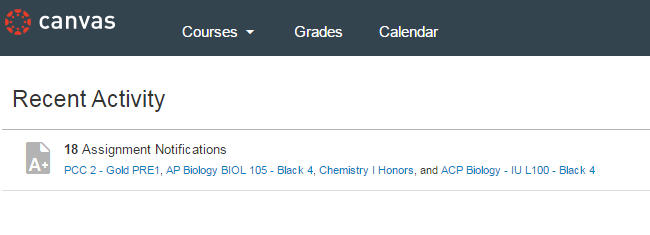
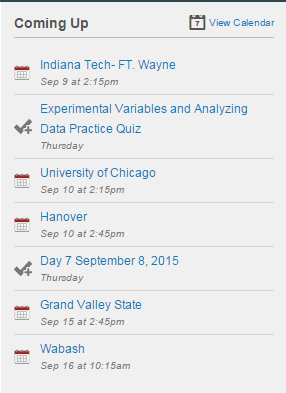
In Canvas, parents are enrolled as observers who are linked to their student(s). Observers have limited permissions that allow them to see what is going on in a course without interrupting the flow of daily course communication. When parents first log in, they will see recent activity and upcoming events on the right.
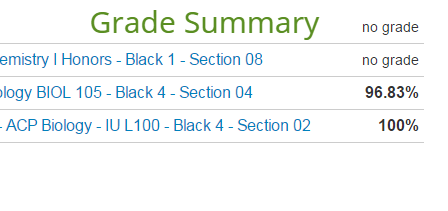
As a parent, you can see the grade summary pages for your student(s). Click on the Grades tab to see the summary.
*Grades in Canvas may be different than in HAC – HAC is the location to go for accurate class grades because it is linked to the teachers’ gradebooks.*
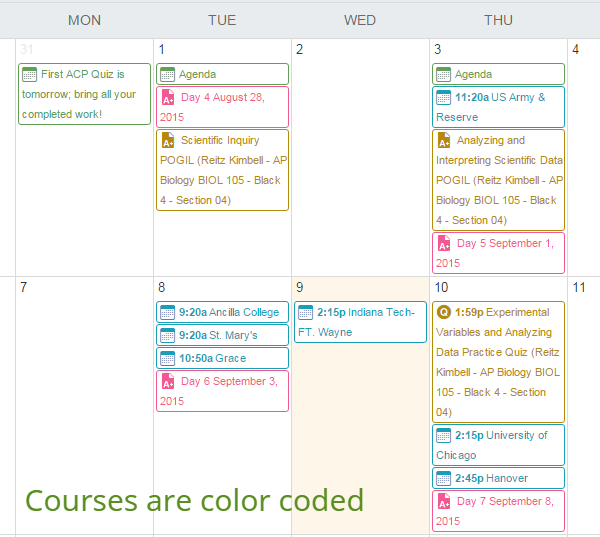
Parents can also see the calendar that will have upcoming assignments and class information. Click on the Calendar tab.
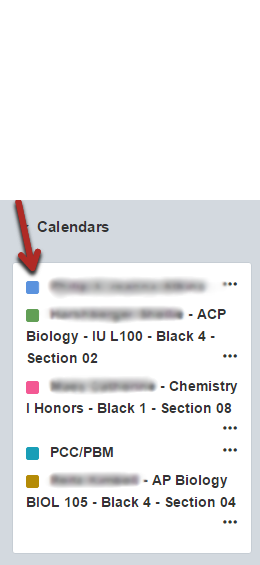
Below is an example of a what a calendar might look like. The courses are all color coded.
Parents will also be able to access each course (that is available) by clicking on the Courses tab.
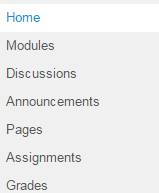
Once inside a class, parents can look at the content available. Classes may have content in modules, discussions, announcements, pages, etc. While in the class, click on the items in the left menu to access the class content. If one of the items on this list doesn’t show, it means the teacher chose not to include it.
Modules
Modules organize class content and resources into units or chapters and helps direct class flow.
Discussions
Class discussions, created and facilitated by teachers allow students to contribute to as many discussion topics as desired. Discussions can also be created as an assignment for grading purposes or simply serve as a forum for classroom discussions.
Announcements
Announcements are designed to allow teachers to deliver information out to an entire class. Parents will receive email notifications for announcements.
Pages
Pages contain class content and resources.
Assignments
Assignments are created to assess how well students are progressing on class learning objectives. These assignments might be graded or for informational purposes only.
Canvas Calendar
Parents can also see the calendar that will have upcoming assignments (if entered in Canvas) and class information. Click on the Calendar tab.
This is the calendar that includes all of your student’s classes. The classes are color coded and you will find a legend on the right side. Below is an example of a what a calendar might look like.
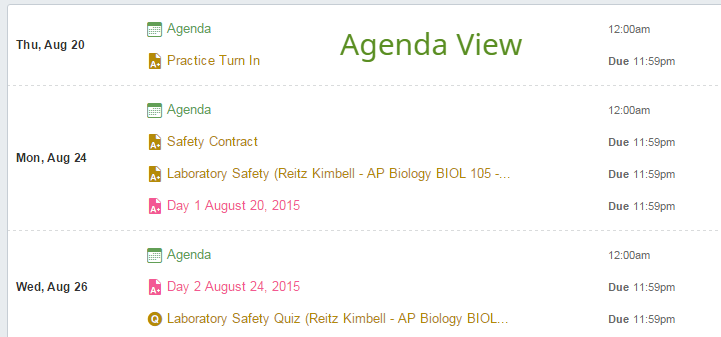
The Calendar can be seen in multiple formats. By default, the calendar will show the current month. It can also be changed to show a week view or an agenda view. Classes are color coded.
Canvas Grades FAQ
Why are my student’s grades different in Skyward ?
Grading in Canvas may not be the complete grade for your student(s). Make sure you always check Skyward as the complete source of your student’s grades. Teachers may not grade assignments in Canvas and only enter the grade for those assignments directly in Skyward . Any grades that are in Canvas may be transferred into Skyward or they might be progress grades only and will not be entered into Skyward as part of the student’s class grade.
Why are there missing scores in Canvas?
Teachers may not grade assignments in Canvas and only enter the grade for those assignments directly in Skyward . It is also possible the assignment was created as a non-graded assignment or as requiring no submission from the student. Other activities in Canvas like discussions and quizzes might also be graded or nongraded activities. Depending on the intent behind the assignment, scores may not appear or be entered in the Canvas.
Who should I contact about grades?
The first person to contact about grades would be your student’s teacher. Please remember that Skyward is the place to check your student’s grades. At this time, Canvas grades are not required to be a student’s complete class grade and it is possible that grades given in Canvas may only be for progress purposes.
Trey Burns signs with Bethel Pilots
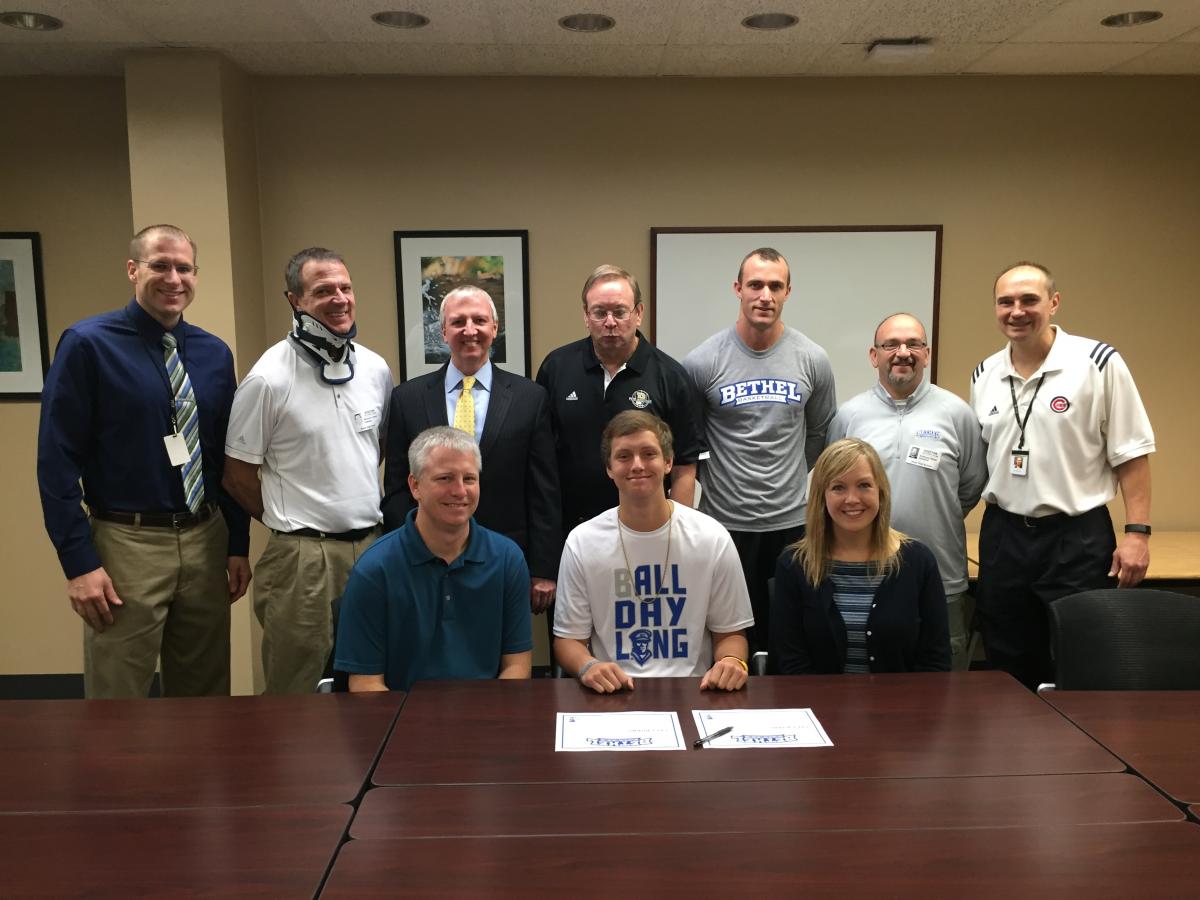
Penn High School student-athlete Trey Burns will continue his academic and basketball careers at Bethel College. Burns, a 6-foot-3 wing with a silky smooth shot and outstanding leaping skills, signed a letter of intent Monday, October 12, at Penn High School.
Back row (l-r): Aaron Leniski, PHS Athletic Director; Mike Lightfoot, Bethel Basketball head coach; Jerry Thacker, PHM Superintendent; Al Rhodes, Penn basketball head coach; Ryne Lightfoot, Bethel assistant coach; Tony Natali, Bethel assistant coach; Joe Sierzputowksi, Penn JV basketball coach. Front row: Trey Burns flanked by his parents, Mark and Lisa Burns.
“I’ve always known about Bethel, growing up around it,” Burns said. “When coach Lightfoot gave me a call to take a visit and meet the players, I felt like I was part of the team, already. It was like a big family, and I liked that.
“This is a great feeling. It’s always been a goal of mine to play college basketball. Bethel is a great program.” Coach Mike Lightfoot’s Bethel Pilots were 27-7 last season and seeded No. 10 in the NAIA national tournament.
Burns said that the Penn High School program under the direction of coach Al Rhodes has prepared him for the collegiate level. “Coach Rhodes has really helped a lot with teaching me fundamentals,” Burns said. “He’s helped me get a better attitude, and he’s developed me into a harder worker.”
Burns helped Penn rack up a 21-6 record, including a 7-1 mark in the Northern Indiana Conference. Last season, Burns average 9.2 points and 4.3 rebounds a game. He scored a career-high 19 points last season in a 97-50 rout of Andrean. While Trey suffered a shoulder injury in the off-season, he is expected to be fully recovered for Penn’s 2015-16 season.
In a statement released by Bethel, coach Lightfoot said:
"We are excited to have Trey as a Bethel Pilot. Trey has a great upside to his basketball career. His shoulder injury has been just a temporary setback and he has a great future ahead of him. Trey brings athleticism and size at the guard position. He is an outstanding student and is a great fit for our program. Trey comes from an outstanding family that I have known for years. We have also been blessed with a long line of Penn graduates over the years that have played for us. They are fundamentally sound and have a great understanding on what it takes to win."
All-Sports Passes for Penn High School athletic events are on sale now in the Athletic Department Office, 8 a.m. to 3:30 p.m., on Mondays-through-Fridays.
It was the one moment on Friday night when Penn High School football coach Cory Yeoman was caught off guard. As Yeoman was being interviewed by the media following Penn’s 16-10 victory….
Penn High School had a strong display of talent on November 11, when 21 student-athletes gathered on “early signing day” to meet the press and formally announce their college plans….
For many years the Penn Girls Soccer team has worked to make the popular Family FunFest, which is part of the community’s annual LOGAN’s Run, a success. Hoping to give them …
Ben Karasiak, Penn High School’s Director of Athletics and Student Activities, and Sandy Heston, Administrative Secretary for the Penn Athletic Department…
On Friday, August 28, the community that had gathered for a great night of high school football was also treated to a very special event: Formal dedication…
Penn-Harris-Madison School Board approved the hiring of Michael Clements as Penn High School’s new Girls Cross Country Coach at the Monday, July 20th Board meeting…
Penn High School Athletics enjoys a legacy of success!
Athletically, Penn High School has established itself as a perennial power in the state of Indiana. Penn teams have won a total of 24 state championships, and 28 Kingsmen student-athletes have won prestigious Indiana High School Athletic Association Mental Attitude Awards.
Penn High School students who are interested in NCAA eligibility can find resources here.
Penn Girls Basketball/Indiana All-Star Coach Kristi Ulrich
Girls Soccer
Penn Football
Unified Track & Field
Penn Orchestra Parents and Supporters (POPS)
POPS is the Penn Orchestra volunteer organization that raises funds to provide items such as: dresses and tuxedos, garment racks, replacement equipment, financial aid for All-State Orchestra participants, scholarships, senior banquets, and other items. Volunteers also contribute to the annual ISSMA Solo and Ensemble contests. In addition, it also provides a forum for communication between parents and teachers of orchestra students. Primary fund raising activities include:
The annual Superintendent’s Luncheon is an opportunity for the community to learn more about P-H-M schools and the P-H-M Education Foundation. P-H-M Superintendent Dr. Jerry Thacker will give his State of the Corporation address, reflecting on the past academic year and sharing his goals for the future. Also, 2014-15 PHMEF grant recipients will be recognized along with honoring the 2015 P-H-M Teacher of the Year Shelia Toth.
The Luncheon is scheduled for Tuesday, October 13, from 12 noon to 1:30 p.m. at Windsor Park Conference Center, 4020 Edison Lakes Parkway, Mishawaka.
The Superintendent’s Luncheon is a fundraiser for the P-H-M Education Foundation to help the organization fund innovative grants.
The Foundation is pleased to announce that Andrew Berlin, South Bend Cubs owner, will be our guest speaker!
For more information about the luncheon or to purchase tickets or a table, go to http://www.phmef.org/.All are invited to attend, but advance reservations are required.
Financial Aid Resources
Financial Aid Resources
The financial aid resources page is being updated and will post again soon.
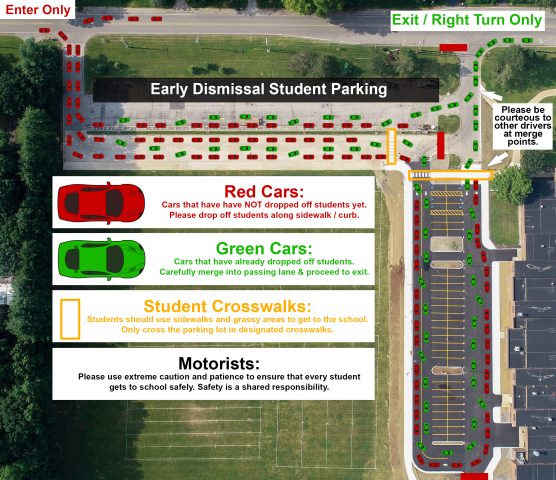
Students are allowed in the building at 7:55 a.m. The designated student morning drop-off is between the hours of 7:30 – 8:25 a.m. Parents/Guardians who are dropping-off students before school or picking-up students after school must use the following one-way route (see image below) located off of Jefferson Rd. (located in the Southeast corner of the campus, south of the practice football field behind the school). Pick-up is allowed to start after 2:30 p.m.
Safety is a shared responsibility.
Motorists must use extreme caution to ensure that every student gets to school safely, and that security personnel are safe. Please be aware of the student pedestrian traffic and traffic guards.
Follow the steps outlined below and pictured in the image and video below.
Only Drop-off or Pick-up students using the Jefferson Rd. designated Drop-off/Pick-up route. Only one lot will be used for student Drop-off/Pick-up with a direct route to exit turning right onto Jefferson Rd. A traffic attendant will be available to assist with access onto Jefferson Rd.
Vehicles may only enter at the East entrance of the Jefferson Rd. Parking Lot (designated by the visible sign at the entrance) and following the designated one-way route.
Stay on the drive and move forward in a single file; please drop students off on curbside only. There is plenty of curbside availability.
Students must walk on curbside sidewalks to Door K, or can go to the front of the school to Doors A, B, C to enter the high school (only drop students off (or pick up) at the Jefferson Rd. Drop-Off area). If student is late in the morning, they are required to report to Door A at the front of the school and sign in. Please be aware that bus traffic at the front of the school is a safety concern.
The one-way traffic route will exit at the West exit of the Jefferson Rd. Parking Lot (Right Turn Only).
The Jefferson Student Lot will be used as part of the daily parent student drop-off and pick-up area; student parking is permitted for early dismissal students only in the south row during mornings. All student vehicles must be gone by 2:30 p.m. daily. No parking will be permitted in the NORTH ROW.